
Frostrail controls
What you can trust about input before Early Access publishes a full bind list.
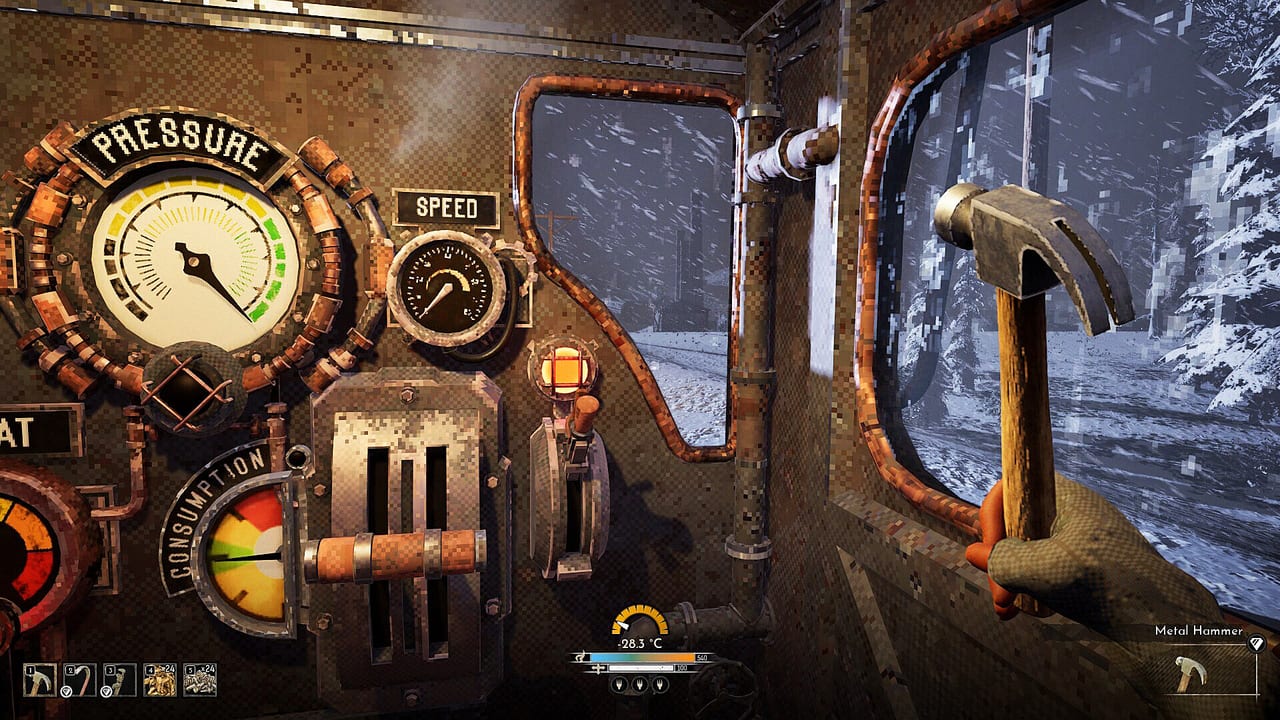
FakeFish has not posted a complete, final keybind table for Frostrail. Anyone selling a “definitive WASD guide” as official is guessing. This page separates what the studio has said, what playtest HUD shots show, and what you should configure so a closed-beta session does not die on a missed interact key.
If you still need the loop, read How to Play first. If you are here because a friend wants to bring a pad, jump to the controller section — the short version is “probably not at Early Access launch.”
What FakeFish has confirmed
- The game is an Unreal Engine 5 first-person shooter. Expect look, move, fire, reload, and interact as first-class actions.
- Controller support is planned, but the studio has said it probably will not be available immediately at the start of Early Access.
- Steam Deck compatibility is listed as unknown on the store page. Do not buy hardware for Frostrail on that promise.
- Linux is a “tentative yes” because a developer works on Linux; Mac is kept in mind; Windows PC on Steam is the only platform they will fully confirm at Early Access.
Until a settings screenshot with a bind list ships in a news post, treat every specific key in a YouTube overlay as that creator’s layout, not as FakeFish’s.
Action groups you should be able to find
Playtest footage and HUD captures still tell you which verbs exist, even without scancodes.
Locomotion and camera. Standard FPS move and look. Sprint and crouch almost certainly exist because blizzard traversal and dungeon clutter demand both. If you rebound these, keep them on the left hand — you will need the right hand for tools and guns in the same minute.
Combat. Fire, aim, reload, melee. Weapons are WW1-esque firearms plus a few melee tools. Ammo is scarce, so a dedicated reload you can hit while backing through a carriage door matters more than a fancy grenade wheel that may not even exist yet. Ranked guns: weapons.
Interact and tools. HUD shots show a Metal Wrench, Metal Hammer, Torch, and firearms on a hotbar, plus an “equipped tool” callout in the corner. Repair happens at dedicated workstations, not by wishing at a dent. You will swap from hammer (cab maintenance) to torch (dungeon) to rifle (exfil) in one stop. Put tool swapping on a key you can hit with gloves-on panic.
Inventory and crafting. Survival FPS with resource management means a bag and benches. Do not bury craft/repair under a five-layer radial if the default is a simple key. You will open it while the temperature number is falling.
Train operations. Cab shots show Pressure, Speed, and Consumption gauges, plus a body-temperature widget that can read −28 °C outside a window. The Eden Engine interior labels Power and Heat on the boiler. Someone in the crew must be able to interact with those systems without thinking. That person should not also be the only one who rebound jump. Details: Train and Eden Engine.
Settings worth touching before a beta night
- Mouse look. Unreal titles vary wildly. Spend two minutes in the tutorial level making a 180 feel honest. You will 180 in a carriage doorway.
- FOV and motion. Blizzard plus indoor boiler glow plus first-person tools is a recipe for nausea. If the build exposes FOV or camera shake, use them.
- Toggle versus hold. Interact, crouch, and sprint defaults will make or break dungeon crawls. Pick holds you can maintain while strafing.
- Audio. Engine rumble is a gameplay signal — it pulls enemies. Do not bury effects under music. Headsets help in co-op because callouts beat pings you may not have.
- Key conflicts. If you overlay Discord push-to-talk on the same key as interact, you will mute yourself every time you fuel the boiler. Fix that before friends board.
Controller and accessibility, without fan fiction
Bring a pad to a closed test only if the build’s menu literally lists gamepad. The FAQ answer is still “later.” If you need remapping for one-handed play or cannot use a mouse, wait for FakeFish to ship official support or confirm Steam Input. This wiki will not invent a community layout and call it official.
Steam Deck users: unknown. UE5 survival FPS with online co-op is a heavy ask. Try only if you accept that performance and binds are unproven.
HUD literacy is a control skill
The widgets are part of the control scheme.
- Temperature. Playtest HUD shows a colored arc and a Celsius reading. +99 °C next to a shrine torch is not a license to stand still forever; −28 °C on the cab window is a warning about the next outing. Clothing and heat management: survival.
- Hotbar. Tools and guns share attention. If your torch occupies the slot you thought was a pistol, you will swing fire at a corrupted soldier. Practice swaps in the tutorial, not in a vault.
- Objectives. Captures show quest chrome such as “THE TRIAL BELOW” and “Search the unknown for a hidden shrine.” Read the tracker before you split the crew. Multiple exits mean the tracker might be optional flavor, not a mandatory clear.
- Co-op icons. Party pips appear on HUD. If you cannot tell who is still in the cellar, you are not ready to start the train.
Practice plan for a first session
Use the tutorial level as a bind lab:
- Bind or accept move, look, fire, reload, interact, tool swap.
- Find Pressure / Speed / Consumption and the temperature meter without a wiki open.
- Repair something on a workstation on purpose.
- Leave the train, walk until the temperature drops, walk back, and survive the doorway.
- Only then host co-op.
When binds feel invisible, the next deaths are loop deaths, not input deaths. Go back to How to Play or pack the survival checklist. Official bind tables, when they exist, will be linked from updates and links.
Frequently Asked Questions
Quick answers to the most common questions.
What are the default Frostrail keybinds?
FakeFish has not published a final official list. Use in-game settings in your test build. This page lists action groups, not invented scancodes.
Can I play Frostrail with a controller at Early Access launch?
The studio says controller support is planned but probably will not be ready at the start of Early Access. Keyboard and mouse is the safe assumption.
Does Frostrail run on Steam Deck?
Steam lists compatibility as unknown. There is no official Deck bind set. Windows PC is the platform they will confirm first.
Where do I learn the cab gauges?
They are part of Train and Eden Engine. Controls only tell you that interacting with those gauges is a first-class action.